
Best Computer Courses for Accounting Jobs in Hyderabad
Best Computer Courses for Accounting Jobs in Hyderabad If you are looking for an accounting job in Hyderabad, knowing basic computer skills is no longer
 Skip to content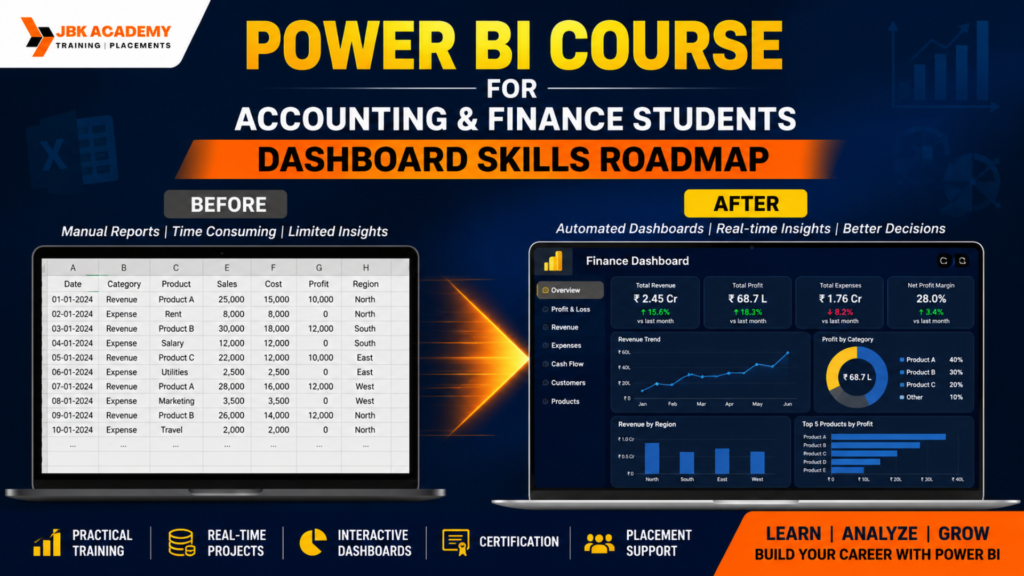
Building interactive dashboards and reports.
Adding and formatting visuals.
Using filters, slicers, and bookmarks to enhance interactivity.
Implementing data governance policies.
Monitoring usage and performance with Power BI Admin Portal.
Data security and compliance considerations.
Overview of Power BI Service features, including Power BI Premium, Power BI Embedded, and Power BI Report Server.
Preparing for Microsoft Power BI certification exams (if applicable).
Assessment of understanding through quizzes, assignments, and projects
Accessing help resources, documentation, and online communities for ongoing learning and support.
The accounting and finance industry has changed dramatically over the last few years. Businesses no longer rely only on Excel spreadsheets and manual reports. Today, organizations expect accountants and finance professionals to analyze large datasets, create interactive dashboards, automate reports, and deliver business insights quickly. This is where Power BI becomes one of the most valuable skills for modern finance professionals. Whether you’re a B.Com student, M.Com graduate, MBA Finance student, CA aspirant, CMA candidate, or a working accountant, learning Power BI can significantly improve your career opportunities. A professional Power BI course for accounting students helps learners understand how to transform financial data into meaningful reports that support better business decisions. If you’re searching for a Power BI course in Hyderabad, this roadmap explains exactly what you need to learn, why each skill matters, and how you can become job-ready. Choosing the right Power BI training institute in Hyderabad ensures you receive hands-on experience with real-time projects, dashboard development, Power Query, DAX, and business reporting. Professional Power BI training typically covers practical projects, dashboard development, Power Query, DAX, real-world datasets, and career support to prepare learners for business analytics roles.
Accounting has traditionally focused on recording transactions, preparing financial statements, and maintaining statutory compliance. However, today’s finance professionals are expected to do much more than bookkeeping. Companies want employees who can analyze financial performance, identify business trends, and provide insights that support strategic decisions. A professional Power BI course for accounting students bridges the gap between traditional accounting and modern business analytics. Instead of spending hours preparing monthly Excel reports, Power BI automates reporting and creates visually appealing dashboards that management can understand instantly. This makes Power BI one of the most in-demand skills in finance and accounting. Students who join a Power BI course in Hyderabad gain practical exposure to business datasets, financial KPIs, and dashboard creation techniques. A reputed Power BI training institute in Hyderabad also provides live projects that simulate real workplace scenarios, helping learners become job-ready.
Traditional accounting focuses on:
Modern finance professionals are expected to do much more.
Companies now expect candidates to:
Instead of spending hours updating Excel files every month, Power BI can refresh reports automatically and visualize business performance within seconds. This is why enrolling in a Power BI course for accounting students has become an excellent career decision. A reputed Power BI training institute in Hyderabad provides practical exposure to financial datasets, helping students build dashboards that employers actually use. Students looking for a Power BI course in Hyderabad also gain experience with live projects that improve analytical thinking and reporting skills, making them more competitive in the job market.
Power BI is Microsoft’s Business Intelligence (BI) and Data Visualization platform that converts raw business data into meaningful dashboards and reports. It enables organizations to collect data from multiple sources, clean and transform it, perform advanced calculations, and present business insights through interactive visualizations. Today, almost every industry including banking, finance, healthcare, retail, manufacturing, and IT uses Power BI for reporting and business intelligence. A Power BI course in Hyderabad teaches students how to connect different data sources, build relationships, create visual reports, and publish dashboards securely. A leading Power BI training institute in Hyderabad provides hands-on practice with real business datasets so students understand how organizations use Power BI for decision-making.
Power BI Can Connect To
What You’ll Learn
Finance departments deal with thousands of transactions every day. Preparing reports manually can be time-consuming and prone to errors. Power BI simplifies this process by automatically collecting data, updating reports, and displaying important financial metrics through interactive dashboards. Professionals who complete a Power BI course for accounting students can create dashboards that help management understand business performance in just a few clicks. This ability makes Power BI professionals highly valuable across industries. A practical finance dashboard course focuses on solving real business problems through visualization. Students attending Power BI training Ameerpet work on live projects that replicate actual finance reporting environments, helping them build confidence before entering the job market.
Power BI Helps Answer Questions Like
These insights help management make faster and more accurate business decisions.
Learning Power BI becomes much easier when you follow a structured roadmap. A professional Power BI course in Hyderabad is designed to take students from Excel fundamentals to advanced dashboard creation using practical business scenarios. Every Power BI training institute in Hyderabad follows a step-by-step approach, allowing students to understand data preparation, modeling, calculations, visualization, and reporting before moving to advanced financial analytics.
The following roadmap is ideal for accounting students, finance professionals, and graduates who want to build career-ready dashboard skills.
Stage 1: Excel Fundamentals
Excel remains the foundation of data analysis. Before creating dashboards in Power BI, students should understand how financial data is organized and analyzed using Excel. Every reputed Power BI training institute in Hyderabad begins with Excel because it builds logical thinking and improves analytical skills.
A quality Power BI course for accounting students teaches advanced Excel concepts that make dashboard development easier. Since many organizations still maintain financial records in Excel, understanding formulas, Pivot Tables, and charts becomes extremely valuable.
Topics Covered
Outcome: Build a strong analytical foundation before learning Power BI.
Stage 2: Understanding Business Data
Before creating dashboards, it is important to understand how business data is structured and how financial transactions flow through an organization. Every business generates large amounts of data from sales, purchases, payroll, inventory, taxation, banking, and customer transactions. A professional Power BI course for accounting students teaches learners how to organize this information and convert it into meaningful reports. A reputed Power BI training institute in Hyderabad helps students work with real-world accounting datasets so they understand how companies analyze financial performance. During Power BI training Ameerpet, learners gain hands-on experience with datasets used by finance departments, improving their analytical and reporting skills.
Business Data You Will Learn
Outcome: Students learn how accounting data is organized and how it can be prepared for dashboard creation.
Stage 3: Importing Data into Power BI
One of Power BI’s biggest strengths is its ability to connect with multiple data sources. Instead of manually copying information into Excel every day, Power BI automatically imports and refreshes business data from different systems. This saves time and reduces reporting errors. A practical Power BI course in Hyderabad teaches students how to connect Excel files, SQL databases, ERP software, and Tally exports with Power BI. Every leading Power BI training institute in Hyderabad focuses on data connectivity because it is one of the most important skills required in real business environments.
Data Sources Covered
Outcome: Students learn how to import, combine, and automate data from multiple business sources.
Stage 4: Power Query
Power Query is the data transformation engine inside Power BI. In real-world projects, business data is often incomplete, duplicated, or incorrectly formatted. Before creating reports, the data must be cleaned and transformed. This is why Power Query is considered one of the most important modules in every finance dashboard course. A professional Power BI training institute in Hyderabad provides extensive practice using Power Query because nearly every business dashboard starts with data cleaning. Students enrolled in a Power BI course in Hyderabad learn practical transformation techniques that improve data quality and reporting accuracy.
Power Query Skills
Outcome: Students gain the ability to prepare clean, structured datasets that are ready for dashboard development.
Stage 5: Data Modeling
Data modeling is the backbone of every Power BI dashboard. It defines how different tables are connected and ensures reports produce accurate calculations. Without proper data modeling, dashboards may show incorrect information or perform slowly. A well-designed Power BI course for accounting students explains industry-standard data modeling techniques used in finance and business intelligence. During Power BI training Ameerpet, students learn how to build efficient relationships between financial datasets, improving both report performance and accuracy.
Data Modeling Concepts
Outcome: Students learn how to organize accounting and finance data into professional reporting models.
Stage 6: DAX (Data Analysis Expressions)
DAX (Data Analysis Expressions) is the formula language used in Power BI. It allows users to create advanced calculations, financial KPIs, dynamic reports, and business metrics that go far beyond traditional Excel formulas. DAX is one of the most valuable skills taught in every Power BI training institute in Hyderabad. Whether you are calculating monthly revenue, gross profit, budget variance, or year-to-date sales, DAX helps convert raw business data into actionable insights. A Power BI course in Hyderabad includes practical DAX exercises that prepare students for real-world finance reporting and analytics roles.
DAX Skills You’ll Learn
Outcome: Build dynamic dashboards using advanced business calculations.
Stage 7: Data Visualization
After cleaning and modeling data, the next step is creating professional dashboards using Power BI visuals. Data visualization makes complex accounting information easy to understand for managers, clients, and decision-makers. A professional finance dashboard course teaches students how to choose the right visual for each business scenario. A reputed Power BI training institute in Hyderabad focuses on dashboard design principles that improve readability, user experience, and business decision-making. Students learn how to present financial information using interactive visuals instead of lengthy spreadsheets.
Visualization Types
Outcome: Students create attractive and interactive dashboards that communicate business performance effectively.
Power BI has become one of the most sought-after Business Intelligence tools across industries. Organizations are actively hiring professionals who can collect, analyze, and visualize business data to support strategic decision-making. After completing a Power BI course for accounting students, learners can explore opportunities in accounting, finance, banking, manufacturing, healthcare, retail, IT, logistics, and consulting companies. A professional Power BI course in Hyderabad equips students with practical skills that employers expect, including dashboard development, Power Query, DAX, data modeling, and business reporting. By working on live projects and building a portfolio, students become job-ready and gain a competitive advantage during interviews. A reputed Power BI training institute in Hyderabad also provides placement assistance, mock interviews, resume preparation, and career guidance to help learners secure rewarding positions.
Building interactive dashboards and reports.
Adding and formatting visuals.
Using filters, slicers, and bookmarks to enhance interactivity.
Implementing data governance policies.
Monitoring usage and performance with Power BI Admin Portal.
Data security and compliance considerations.
Overview of Power BI Service features, including Power BI Premium, Power BI Embedded, and Power BI Report Server.
Preparing for Microsoft Power BI certification exams (if applicable).
Assessment of understanding through quizzes, assignments, and projects
Accessing help resources, documentation, and online communities for ongoing learning and support.
A structured Power BI course for accounting students helps learners develop both technical and analytical skills that are highly valued by employers. Instead of focusing only on software operation, the course teaches students how to solve real business problems using data visualization and reporting techniques. By the end of the training, students will be able to create professional dashboards, automate reporting processes, analyze financial performance, and communicate insights effectively. These practical skills improve employability and prepare learners for careers in Business Intelligence and data analytics.
Technical Skills
Professional Skills
A Power BI course in Hyderabad is suitable for beginners as well as experienced professionals who want to enhance their analytical skills. Since Power BI does not require advanced programming knowledge, anyone with basic computer skills and an interest in data analysis can start learning. Whether you are pursuing higher education, working in finance, or planning a career switch, Power BI provides excellent opportunities for professional growth. Students joining a Power BI training institute in Hyderabad receive structured learning that takes them from the fundamentals to advanced dashboard development.
This Course is Ideal For
Choosing the right institute plays a major role in your learning journey. A reputed Power BI training institute in Hyderabad focuses on practical knowledge rather than just theoretical concepts. Students receive hands-on experience with live business datasets, interactive dashboard development, Power Query, DAX, and financial reporting techniques used by leading organizations. Our Power BI training Ameerpet is designed to prepare students for real-world careers through project-based learning, industry-oriented curriculum, and continuous mentor support. From beginner-level concepts to advanced Business Intelligence techniques, every module is structured to help learners become confident Power BI professionals.
Why Students Choose Us
Power BI has become one of the fastest-growing Business Intelligence platforms in the world. Companies are replacing traditional reporting methods with interactive dashboards that provide real-time business insights. Learning Power BI not only improves technical skills but also enhances career opportunities across multiple industries. Students who complete a Power BI course for accounting students develop strong analytical abilities, making them valuable assets to employers. The ability to automate reports, analyze trends, and present business insights visually is highly appreciated in modern organizations.
Key Benefits
Choosing the right training institute is one of the most important steps in building a successful career. At JBK Academy, we focus on practical learning, industry-relevant training, and career development to ensure every student is ready for the job market. Our courses are designed by experienced trainers and include real-time projects, hands-on practice, and placement-focused learning to help students gain confidence and industry-ready skills.
Industry-Focused Curriculum
Our course syllabus is regularly updated to match current industry standards and employer requirements, ensuring you learn the latest tools and technologies.
Experienced Trainers
Learn from certified professionals with real-world industry experience who provide practical insights, hands-on guidance, and personalized mentorship.
Practical Hands-on Training
Every course includes live practice sessions, assignments, case studies, and real-time projects so you gain practical experience—not just theoretical knowledge.
Live Projects & Case Studies
Build industry-ready skills by working on real business scenarios and portfolio-worthy projects that strengthen your practical expertise.
Resume Building & Interview Preparation
Our career support includes professional resume preparation, mock interviews, aptitude guidance, and interview tips to help you perform confidently during recruitment.
Placement Assistance
We provide placement assistance and connect students with hiring opportunities through our recruiter network, helping them begin their careers with confidence.
ISO Certified Training Institute
JBK Academy is an ISO-certified institute committed to delivering high-quality, industry-oriented education.
Recorded Sessions
Students receive access to recorded classes for revision, allowing them to review concepts anytime and learn at their own pace.
Flexible Learning Options
Choose from classroom, online, weekday, or weekend batches that fit your schedule and learning preferences.
Course Completion Certificate
Receive a course completion certificate after successfully finishing your training, showcasing your newly acquired skills.
Dedicated Student Support
Our support team and trainers are always available to assist with technical questions, assignments, projects, and career guidance throughout your learning journey.
Business Intelligence has transformed the way organizations analyze and manage financial information. Power BI enables businesses to convert raw data into interactive dashboards that support faster and more informed decision-making. As companies continue adopting data-driven strategies, professionals with Power BI skills are becoming increasingly valuable across industries. A professional Power BI course in Hyderabad provides students with the knowledge and practical experience required to build interactive dashboards, automate reports, and analyze business performance. Whether you are a student, accountant, finance professional, or working executive, enrolling in a reputed Power BI training institute in Hyderabad can help you build a successful career in Business Intelligence, finance, and data analytics. With expert guidance, live projects, and placement support through Power BI training Ameerpet, you can become job-ready and confidently step into the growing world of data-driven decision-making.
1. Is Power BI suitable for accounting students?
Yes. Power BI helps accounting students analyze financial data, automate reports, and create professional dashboards used in modern organizations.
2. Do I need programming knowledge to learn Power BI?
No. Basic computer knowledge and familiarity with Excel are sufficient to begin learning Power BI.
3. What is the duration of a Power BI course?
Most training programs range from 6 to 10 weeks, depending on the curriculum and learning mode.
4. Can Power BI connect with Tally data?
Yes. Power BI supports importing Tally export data, making it useful for accountants and finance professionals.
5. Which industries hire Power BI professionals?
Banking, finance, healthcare, retail, manufacturing, IT, logistics, insurance, education, and consulting companies all hire Power BI professionals.
6. What job roles can I get after completing Power BI training?
You can apply for roles such as Power BI Developer, Data Analyst, Business Intelligence Analyst, Financial Analyst, MIS Executive, Reporting Analyst, and Dashboard Developer.
7. Is DAX an important part of Power BI?
Yes. DAX is essential for creating advanced calculations, KPIs, financial metrics, and dynamic reports.
8. Will I work on live projects during the course?
Yes. A quality Power BI training institute in Hyderabad includes real-time projects to help students gain practical experience.
9. Does the course provide placement assistance?
Many institutes offer placement assistance, resume preparation, interview training, and career guidance.
10. Why should I choose Power BI training in Hyderabad?
Hyderabad is one of India’s leading IT and business hubs, offering excellent training institutes, experienced mentors, and strong career opportunities in Business Intelligence and analytics.
Best Computer Courses for Accounting Jobs in Hyderabad If you are looking for an accounting job in Hyderabad, knowing basic computer skills is no longer
Photoshop Course in Hyderabad: Beginner Roadmap for Design and Marketing Photoshop is one of the most widely recognized tools in the creative industry. From social
YouTube Video Editing Course: Skills Needed for Content Creators Creating videos for YouTube is no longer only about recording good footage. Successful creators need to
Video Editing Course in Hyderabad: Skills, Software and Career Opportunities Video has become one of the most powerful forms of digital communication. From YouTube videos
Graphic Designing Course in Hyderabad: Tools, Portfolio and Career Scope Choosing the right graphic designing course in Hyderabad can be an important first step for
Digital Marketing Course in Hyderabad: SEO, Google Ads and Social Media Career Path Choosing the right Digital Marketing course in Hyderabad can be an important
Tally vs Advanced Excel vs SAP FICO vs Power BI: Which Course Should You Choose? Choosing between Tally, Advanced Excel, SAP FICO, and Power BI
Accounting Course for Career Gap Candidates and Homemakers: Restart Roadmap Returning to work after a career break can feel challenging, especially when technology, workplace expectations,
MS Office Course in Ameerpet: Basic Computer Skills for Office Jobs In today’s workplace, basic computer knowledge is no longer an optional skill. Whether you
ITR and GST Tax Practitioner Course: How to Start a Tax Filing Career Taxation is an essential part of every business and financial system. Individuals
SAP FICO After Tally: Best Learning Path for Accountants For students and accounting professionals planning to build a career in finance, learning Tally first and
Zoho Books Course in Hyderabad: Cloud Accounting Skills for Freshers The shift from traditional accounting to cloud-based financial management has created new opportunities for students,
Advanced Excel and Tally Course: Best Skill Combination for Accounting Jobs Accounting has evolved significantly over the past decade. Businesses no longer rely solely on
Best Accounting Courses After 12th or Graduation in Hyderabad Start Your Career with the Best Accounting Course in Hyderabad Choosing the right career after completing
Tally Prime with GST Course: Complete Practical Syllabus for Beginners Accounting is one of the most stable and in-demand career fields in today’s business world.
Power BI Course for Accounting and Finance Students: Dashboard Skills Roadmap Introduction to Power BI Overview of Power BI and its capabilities. Installation and setup
SAP FICO Course in Ameerpet Hyderabad: Syllabus, Eligibility and Jobs Finance departments are rapidly adopting enterprise resource planning systems to manage accounting, taxation, cost control,
GST and ITR Filing Course in Hyderabad: Who Can Learn and Career Scope Tax compliance is an essential part of every business, professional practice and
Advanced Excel Course in Ameerpet: Skills, Syllabus, and Career Benefits Advanced Excel is one of the most useful job skills for students, freshers, accountants, office
Accounting Course After B.Com: Best Learning Path for Freshers in Hyderabad The best accounting course after BCom teaches practical accounting, TallyPrime, GST, TDS, income-tax procedures,