Why MS Office Skills Are Important for Freshers and Office Jobs
Why MS Office Skills Are Important for Freshers and Office Jobs For freshers entering the job market, technical skills are important, but not every useful
 Skip to content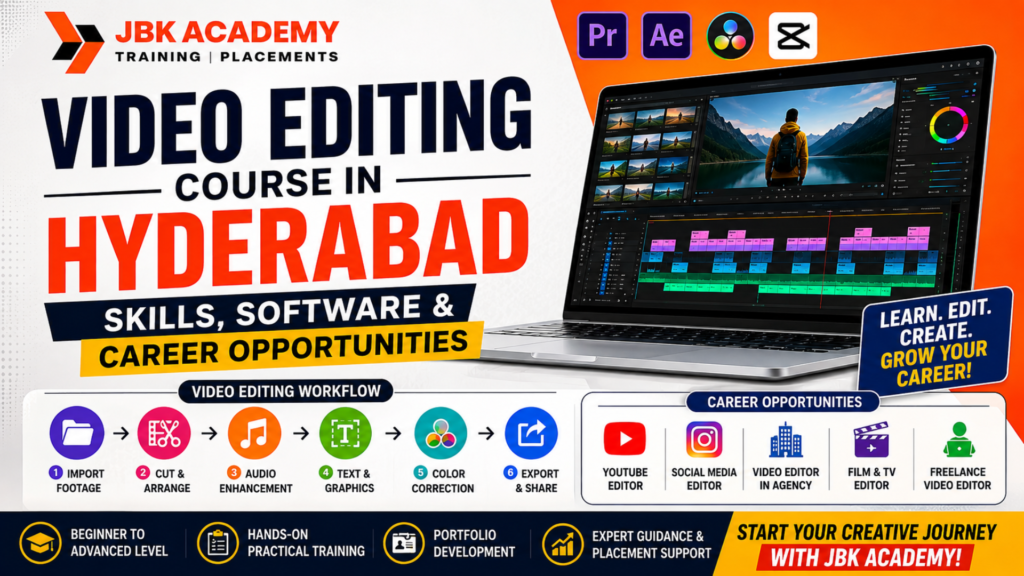
Video has become one of the most powerful forms of digital communication. From YouTube videos and Instagram Reels to advertisements, corporate content, podcasts, online courses, and short films, businesses and creators increasingly depend on professional video content to reach their audiences.This growing demand has created opportunities for people with practical video editing skills. For students, graduates, working professionals, and beginners who enjoy creativity and technology, video editing can be an accessible skill to learn and develop into a professional career.If you are searching for a video editing course in Hyderabad, it is important to look beyond simply learning editing software. A good course should teach you how to turn raw footage into engaging content, understand different editing styles, work with audio and visuals, create content for different platforms, and build a portfolio that demonstrates your skills.This guide explains the skills, software, learning roadmap, career opportunities, and practical benefits of joining a video editing training institute in Hyderabad, with a focus on beginners who want to explore video editing as a career.
Yes, video editing can be a good career for beginners who are willing to develop creative, technical, and storytelling skills.
The growth of YouTube, Instagram, short-form video, digital advertising, online education, podcasts, OTT content, personal branding, and the creator economy has increased the need for video content across industries.A beginner does not necessarily need to start with advanced filmmaking or expensive equipment. Many editors begin by learning the fundamentals of editing and gradually develop skills in:
The career can also offer different working models. An editor may work as an employee at a company, join a creative agency, work with a production house, become a freelance editor, or build a personal editing business.For beginners, the biggest advantage is that video editing is a skill-based field. Your portfolio can demonstrate what you are capable of creating.
The way people consume information has changed dramatically.Instead of relying only on newspapers, websites, or traditional television, audiences now consume large amounts of content through video platforms and social networks.
Businesses use videos for:
Creators use videos for:
This creates opportunities for editors who can understand not only software but also what makes a video interesting and effective.
A professional editor needs to understand pacing, storytelling, music, visuals, audience attention, branding, and platform requirements.
That is why modern video editing training should go beyond learning buttons and menus.
A video editor takes raw footage and transforms it into a finished video.However, professional editing involves much more than simply cutting clips.
A typical editing workflow can include:
1. Understanding the Brief
Before editing begins, the editor needs to understand the objective of the video.
For example:
The intended audience and platform influence the editing style.
2. Organizing Footage
Editors may receive multiple video clips, audio files, graphics, photographs, and other assets.
Organizing the files properly helps make the editing process faster.
3. Selecting the Best Shots
Not every recorded clip needs to be used.
Editors identify the strongest footage and remove unnecessary portions.
4. Creating the Timeline
The selected clips are arranged into a sequence that communicates the intended story or message.
5. Adding Audio
Voiceovers, dialogue, background music, sound effects, and ambient sound can significantly affect the viewer’s experience.
6. Adding Graphics
Editors may add:
7. Color Correction
Color correction helps create consistent and visually pleasing footage.
8. Final Export
The completed video is exported according to the required platform and format.
This workflow is why professional video editing classes should include practical assignments rather than only software demonstrations.
A strong beginner-focused editing course should gradually introduce the following skills.
Video Editing Fundamentals
Beginners should first understand:
These are the building blocks of video editing.
Once these fundamentals are comfortable, students can move into more advanced workflows.
Storytelling and Editing
Software knowledge alone does not make someone a great editor.
Storytelling is one of the most important skills.
Consider a five-minute video containing twenty clips.
Simply placing those clips one after another may produce a technically correct video, but it may not keep viewers interested.
A skilled editor asks:
What should the viewer see first?
When should the scene change?
Where should the music increase?
Which moment deserves emphasis?
Which unnecessary portion should be removed?
These decisions influence audience engagement.
Therefore, a good editing course for beginners should teach students how to think like an editor, not simply how to operate software.
Audio Editing Skills
Poor audio can make an otherwise good video feel unprofessional.
Beginners should understand basic audio concepts such as:
For YouTube videos, interviews, podcasts, advertisements, and educational content, clear dialogue is particularly important.
Learning audio alongside video editing can therefore make a beginner’s work more professional.
Color Correction and Color Grading
Color plays an important role in the visual appearance of a video.
Color Correction
Color correction focuses on making footage look consistent and natural.
Editors may adjust:
Color Grading
Color grading is more creative.
It can be used to establish a particular visual mood or style.
For example, a commercial, cinematic video, travel vlog, and corporate presentation may all use different visual treatments.
Beginners should first understand correction before attempting complex cinematic grading.
Motion Graphics and Text Animation
Modern digital content frequently combines video with animated graphics.
Motion graphics can include:
These skills are particularly useful for agencies and social media content teams.
A video editor who can combine editing with basic motion graphics can potentially handle a wider variety of projects.
Video Editing Software Beginners Should Learn
Different software platforms are suited to different workflows.
Some of the most relevant tools for beginners and aspiring professional editors include:
The exact software you should learn depends on your career objective and the type of content you want to create.
Adobe Premiere Pro
Adobe Premiere Pro is widely used for professional video editing workflows.
It can be used for:
Beginners can start with basic editing and gradually move toward more advanced workflows.
Important areas to learn include:
Premiere Pro is especially useful when you want to build a professional editing workflow.
Adobe After Effects
After Effects is particularly useful for motion graphics and visual effects.
It can be used for:
For beginners, After Effects may have a steeper learning curve than basic video editing software.
A practical learning path is to first understand video editing fundamentals and then introduce motion graphics.
The combination of Premiere Pro + After Effects can be valuable for editors who want to work on professional digital content.
DaVinci Resolve
DaVinci Resolve is another powerful platform that combines video editing, color, audio, and visual effects workflows.
It is particularly known for its color-related capabilities while also providing comprehensive editing functionality.
Beginners can use it to learn:
It can be a useful option for students who want to explore a comprehensive editing environment.
CapCut and Short-Form Video Editing
Short-form video has become an important part of social media content.
Platforms such as Instagram, YouTube Shorts, and other short-video channels require editors who understand fast-paced editing.
Short-form editing may involve:
Beginners can use short-form projects to practice editing speed and storytelling.
However, aspiring professional editors should also learn more comprehensive desktop editing workflows rather than depending exclusively on mobile-oriented tools.
Video Editing for YouTube
YouTube has created an entire ecosystem around video content.
Channels can cover:
Editors working with YouTube creators may be responsible for:
YouTube editing requires a strong understanding of viewer retention.
The goal is not simply to make the video look attractive. The edit should support the content and keep the audience engaged.
Video Editing for Social Media
Social media has created another major category of editing work.
Businesses and creators frequently need content in different formats.
An editor may need to create:
9:16 vertical videos for short-form platforms.
16:9 horizontal videos for YouTube and other platforms.
1:1 or other formats for specific social media requirements.
Editors must understand how the same content can be adapted for different platforms.
For example, a long interview can potentially be transformed into:
This ability to repurpose content can be highly valuable for agencies and creators.
Video Editing for Digital Marketing Agencies
Marketing agencies are another important career path for video editors.
Agencies may create content for multiple clients across industries.
Projects can include:
Agency editors often need to work quickly and manage multiple projects.
They may also need to follow brand guidelines.
This means students should learn not only editing but also:
Freelance Video Editing Opportunities
Freelancing can provide another career path for skilled editors.
A freelancer may work directly with:
Beginners can start by building a small portfolio and gradually taking on more complex projects.
A strong freelance profile should clearly communicate:
What type of videos can you edit?
What software do you use?
What style do you specialize in?
What examples can you show?
Instead of saying only “I am a video editor,” a stronger positioning could be:
“I edit YouTube educational videos and short-form social media content for creators and brands.”
Specific positioning can make it easier for potential clients to understand your services.
A video editing course can lead to several different roles.
Junior Video Editor
Entry-level editors typically work under senior editors or creative teams.
Social Media Video Editor
Focuses on short-form content, Reels, Shorts, advertisements, and social media campaigns.
YouTube Video Editor
Works with creators and channels to produce long-form and short-form content.
Motion Graphics Designer
Combines video with animated graphics, typography, and visual elements.
Post-Production Editor
Works on more structured production workflows involving professional footage and post-production processes.
Freelance Video Editor
Works independently for multiple clients.
Content Editor
Combines editing with broader content production and digital marketing requirements.
Assistant Editor
Supports larger post-production teams with media organization, project preparation, editing support, and other workflows.
The exact role depends on the student’s portfolio and specialization.
Choosing a course requires more consideration than simply checking the software list.
When evaluating a video editing training institute Hyderabad, look at the following factors.
1. Practical Projects
Does the course include real editing assignments?
Students should practice on different formats rather than only follow tutorials.
2. Software Training
Check whether the curriculum includes relevant professional editing tools.
3. Portfolio Development
A good course should help you create work that you can actually show to potential employers or clients.
4. Industry-Oriented Workflow
Students should understand how professional projects move from raw footage to final delivery.
5. Trainer Experience
Experienced instructors can provide practical insights that are difficult to learn from software tutorials alone.
6. Beginner-Friendly Curriculum
A beginner should be able to start from fundamentals without assuming advanced knowledge.
7. Career Guidance
Interview preparation, portfolio reviews, and career guidance can help students transition from training to employment or freelancing.
Hyderabad has a growing digital ecosystem involving technology companies, startups, agencies, creators, educational businesses, media organizations, and production teams.For someone searching for a video editing course in Hyderabad, the important question is not simply “Which software will I learn?”
Instead, ask:
Will this course help me create professional-quality projects?
Will I build a portfolio?
Will I learn both long-form and short-form editing?
Will I understand social media content?
Will I learn audio, color, graphics, and storytelling?
Will I receive practical guidance from trainers?
These questions can help beginners compare different courses and choose training that aligns with their career goals.
If you’re considering JBK Academy for your video editing journey, the goal should be to build practical creative skills rather than simply complete a software course.
A beginner-friendly learning pathway can help students understand the complete process:
Raw Footage → Editing → Audio → Color → Graphics → Export → Portfolio
At JBK Academy, aspiring editors can focus on developing the practical skills required to create content for modern digital platforms.Whether your interest is YouTube, social media, advertising, freelancing, or creative content production, learning through practical projects can help you understand how editing skills translate into real-world work.When comparing a video editing training institute in Hyderabad, consider the complete learning experienceincluding software, practical assignments, projects, portfolio development, and career-oriented guidance.
A structured learning roadmap can make the process easier.
Month 1: Editing Fundamentals
Learn:
Practice with simple videos.
Month 2: Storytelling and Audio
Learn:
Create short storytelling projects.
Month 3: Color and Advanced Editing
Learn:
Month 4: Motion Graphics
Learn:
Month 5: Social Media and YouTube
Create:
Month 6: Portfolio and Career Preparation
Build a portfolio containing several different editing styles.
For example:
This gives potential employers or clients a clearer understanding of your capabilities.
Students sometimes wonder whether they should choose video editing, graphic design, animation, or digital marketing.
These fields overlap but have different core skills.
Video Editing
Focuses on footage, storytelling, pacing, audio, and visual communication.
Graphic Design
Focuses primarily on static visual communication such as posters, branding, layouts, and social media graphics.
Motion Graphics
Combines graphic design with animation.
Animation
Focuses on creating movement and visual sequences through animation techniques.
Digital Marketing
Focuses on using digital channels to promote products, services, brands, and content.
Video editing can complement all of these skills.
For example, a social media professional who understands video editing can create stronger content, while a graphic designer with motion graphics skills can produce animated social media assets.
Learning Software Without Practicing
Watching tutorials is useful, but editing requires hands-on practice.
Using Too Many Effects
Professional editing is not about adding an effect to every transition.
Effects should support the story.
Ignoring Audio
Poor audio can significantly reduce the quality of a video.
Copying Trends Without Understanding Them
Trends can provide inspiration, but editors should understand why a particular editing style works.
Not Building a Portfolio
A certificate alone does not demonstrate your editing ability.
Create projects that showcase your actual skills.
Trying to Learn Everything Immediately
Start with basic editing, then gradually move toward color, audio, motion graphics, and advanced workflows.
Is video editing a good career for beginners?
Yes. Video editing can be a good career for beginners because the skill is applicable across YouTube, social media, advertising, agencies, businesses, education, entertainment, and freelancing. Beginners can start with fundamental editing skills and gradually specialize.
How long does it take to learn video editing?
The basics can be learned relatively quickly, but professional-level editing requires consistent practice. A structured course combined with regular project work can help beginners progress faster.
Which software is best for video editing beginners?
There is no single best software for everyone. Adobe Premiere Pro, DaVinci Resolve, and other editing platforms can provide strong foundations. The right choice depends on the learner’s goals, workflow, and target career.
Can I become a video editor without a degree?
Yes. Video editing is largely skill and portfolio driven. While formal education can be useful, practical editing ability and a strong portfolio can be important when applying for jobs or attracting freelance clients.
Can video editors work from home?
Many editing projects can be completed remotely because the primary work is performed on a computer. Freelancers and remote editors may work with clients from different cities or countries.
Is video editing useful for YouTube?
Absolutely. YouTube creators require editing for long-form videos, Shorts, interviews, tutorials, reviews, podcasts, educational videos, and many other formats.
Is video editing useful for social media?
Yes. Social media platforms rely heavily on video content, particularly short-form videos. Editors who understand vertical video, captions, pacing, hooks, and mobile-first storytelling can work on a wide range of social content.
Is freelancing possible after a video editing course?
Yes. However, completing a course does not automatically guarantee freelance clients. Beginners need to build a portfolio, develop a clear service offering, communicate professionally, and consistently improve their skills.
If you’re a beginner looking for video editing classes, want an editing course for beginners, or are comparing a video editing training institute Hyderabad, JBK Academy can be considered as part of your learning journey.
The objective should be simple:
Learn the tools. Practice the skills. Create real projects. Build your portfolio. Prepare for the industry.
Don’t just learn how to cut clips.
Learn how to tell stories through video.
Ready to Start Your Video Editing Career?
Join JBK Academy and start building practical video editing skills for YouTube, social media, agencies, digital content, and freelance opportunities.
Learn. Create. Edit. Build your portfolio.
Your editing career can start with your next project.
Why MS Office Skills Are Important for Freshers and Office Jobs For freshers entering the job market, technical skills are important, but not every useful
What Is Power BI and How Is It Used in Data Analytics? Businesses generate large amounts of data every day. Sales transactions, customer information, financial
Power BI vs Advanced Excel: What Should Beginners Learn First? Data is now an important part of almost every business. Companies use sales figures, customer
Tally Course for Beginners: Step-by-Step Roadmap to Learn Accounting Software Learning accounting software can be an important step for students, job seekers, business owners, and
Job-Oriented Accounting Course in Ameerpet: What Students Should Check Before Joining Choosing a job oriented accounting course in Ameerpet is an important decision for students,
Best Computer Courses for Accounting Jobs in Hyderabad If you are looking for an accounting job in Hyderabad, knowing basic computer skills is no longer
Photoshop Course in Hyderabad: Beginner Roadmap for Design and Marketing Photoshop is one of the most widely recognized tools in the creative industry. From social
YouTube Video Editing Course: Skills Needed for Content Creators Creating videos for YouTube is no longer only about recording good footage. Successful creators need to
Video Editing Course in Hyderabad: Skills, Software and Career Opportunities Video has become one of the most powerful forms of digital communication. From YouTube videos
Graphic Designing Course in Hyderabad: Tools, Portfolio and Career Scope Choosing the right graphic designing course in Hyderabad can be an important first step for
Digital Marketing Course in Hyderabad: SEO, Google Ads and Social Media Career Path Choosing the right Digital Marketing course in Hyderabad can be an important
Tally vs Advanced Excel vs SAP FICO vs Power BI: Which Course Should You Choose? Choosing between Tally, Advanced Excel, SAP FICO, and Power BI
Accounting Course for Career Gap Candidates and Homemakers: Restart Roadmap Returning to work after a career break can feel challenging, especially when technology, workplace expectations,
MS Office Course in Ameerpet: Basic Computer Skills for Office Jobs In today’s workplace, basic computer knowledge is no longer an optional skill. Whether you
ITR and GST Tax Practitioner Course: How to Start a Tax Filing Career Taxation is an essential part of every business and financial system. Individuals
SAP FICO After Tally: Best Learning Path for Accountants For students and accounting professionals planning to build a career in finance, learning Tally first and
Zoho Books Course in Hyderabad: Cloud Accounting Skills for Freshers The shift from traditional accounting to cloud-based financial management has created new opportunities for students,
Advanced Excel and Tally Course: Best Skill Combination for Accounting Jobs Accounting has evolved significantly over the past decade. Businesses no longer rely solely on
Best Accounting Courses After 12th or Graduation in Hyderabad Start Your Career with the Best Accounting Course in Hyderabad Choosing the right career after completing
Tally Prime with GST Course: Complete Practical Syllabus for Beginners Accounting is one of the most stable and in-demand career fields in today’s business world.