Why MS Office Skills Are Important for Freshers and Office Jobs
Why MS Office Skills Are Important for Freshers and Office Jobs For freshers entering the job market, technical skills are important, but not every useful
 Skip to content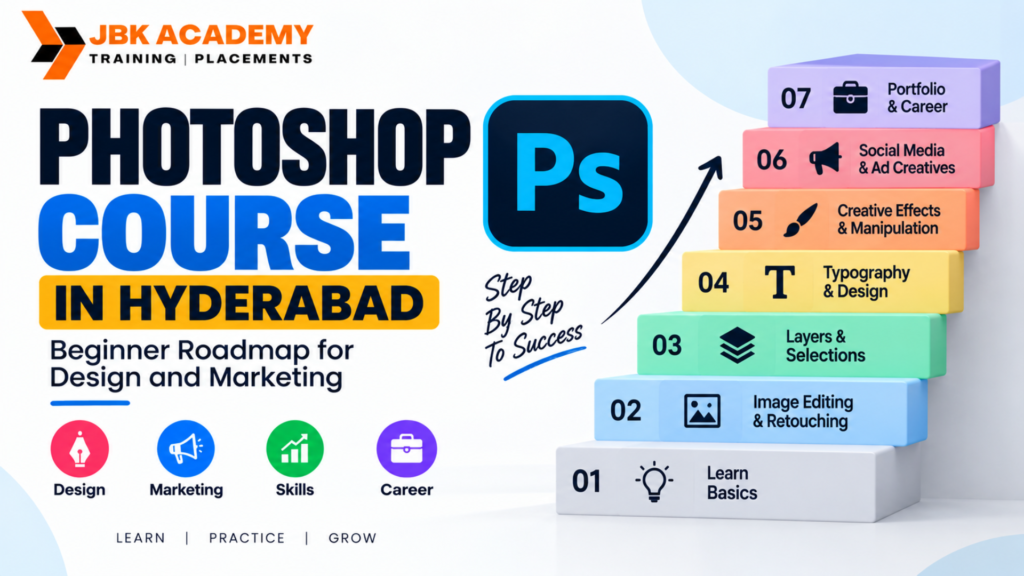
Photoshop is one of the most widely recognized tools in the creative industry. From social media posts and advertising banners to website graphics, product creatives, photo editing, and marketing campaigns, Photoshop continues to play an important role in visual communication. For beginners in Hyderabad, learning Photoshop can be a practical starting point for developing skills in graphic design and digital marketing. A structured Photoshop course in Hyderabad can help students move from basic image editing to creating professional marketing and design assets. For students looking for a training institute, JBK Academy can be considered as an option for learning Photoshop and developing practical design skills. But is Photoshop useful for graphic design and digital marketing? What should a beginner learn first? Which projects should students create? And how can Photoshop skills contribute to a professional portfolio? This beginner roadmap explains the essential Photoshop skills, practical applications, learning stages, portfolio ideas, and career opportunities for students considering Photoshop training in Hyderabad.
Adobe Photoshop is a professional image-editing and graphic-design application used for creating, editing, manipulating, and enhancing visual content.
Although Photoshop started primarily as an image-editing tool, its applications have expanded significantly. Designers and marketers use it for a wide range of creative tasks, including:
Because of this versatility, Photoshop remains an important part of many designers’ graphic design tools.
For beginners, the software can initially appear complicated because it includes a large number of tools and features. A structured course can make the learning process easier by introducing these tools step by step.
Yes. Photoshop is highly useful for both graphic design and digital marketing.
For graphic designers, Photoshop provides tools for image manipulation, composition, typography, layouts, color adjustments, visual effects, and creative artwork.
For digital marketers, Photoshop can be useful for creating visual content such as:
A marketer does not necessarily need to become an advanced graphic designer, but understanding Photoshop can help them communicate better with creative teams and produce or modify marketing visuals when required.
This makes Photoshop particularly valuable for beginners interested in careers that combine design and marketing.
Hyderabad has a growing ecosystem of businesses, startups, agencies, educational institutions, e-commerce companies, media organizations, and marketing teams that depend on digital content. As businesses increasingly use social media and online advertising to reach customers, visual content has become an important part of marketing communication. This creates opportunities for people who understand how to create and edit digital graphics.
A Photoshop course in Hyderabad can help beginners build foundational skills before progressing toward broader areas such as:
Learning Photoshop can therefore be useful not only for someone who wants to become a full-time graphic designer but also for marketing professionals, entrepreneurs, content creators, and students.
A beginner-friendly Photoshop curriculum should ideally progress from fundamental tools to practical projects.
Students can learn:
The objective should not simply be to memorize Photoshop tools.
Students should learn how and when to use each tool to solve a design problem.
If you are completely new to Photoshop, following a structured learning roadmap can make the process much easier.
Stage 1: Understand the Photoshop Interface
The first step is becoming comfortable with the Photoshop workspace.
Beginners learn about:
At this stage, students should focus on understanding where different tools are located and what they do.
There is no need to master every Photoshop feature immediately.
Stage 2: Learn Image Editing Basics
Once students understand the interface, they can begin working with images.
Basic image-editing skills include:
Cropping
Cropping helps remove unwanted areas and improve image composition.
Resizing
Designers frequently need to resize images for different platforms.
For example, an image may need different dimensions for:
Resolution
Understanding image resolution is important when preparing graphics for digital or print use.
File Formats
Students should understand common formats such as:
Knowing which format to use for a particular purpose is an important practical skill.
Stage 3: Master Layers
Layers are one of the most important concepts in Photoshop.
Instead of placing everything into a single image, designers can organize different elements on separate layers.
For example, a social media advertisement might contain:
Keeping these elements separate makes the design easier to edit.
Students should learn:
A strong understanding of layers forms the foundation for more advanced Photoshop work.
Stage 4: Selection Tools and Background Removal
Selection is another fundamental Photoshop skill.
Students learn how to isolate specific portions of an image.
Common selection methods include:
These skills can be used for:
Background removal is especially useful in e-commerce and advertising design.
For example, a product photograph can be separated from its original background and placed into a promotional layout.
Stage 5: Learn Color Correction and Image Adjustments
Professional visual communication often requires more than simply adding text and images.
Students should understand how to improve the appearance of photographs through adjustments.
They can learn concepts such as:
These tools can help designers create consistent visual styles.
For marketing campaigns, maintaining consistent colors across multiple graphics can also support brand identity.
Stage 6: Typography and Text Design
Typography is an important part of graphic design.
Photoshop allows students to combine images with headlines, captions, promotional messages, and calls to action.
Students should learn:
For example, a promotional poster should have a clear visual hierarchy.
The viewer should quickly understand:
What is being promoted?
What is the main benefit?
What action should they take?
Good typography helps communicate this information clearly.
Stage 7: Learn Masks and Non-Destructive Editing
As students progress, they should learn techniques that allow them to make changes without permanently damaging the original image.
Layer masks are particularly useful for:
Students can also learn about adjustment layers and smart objects.
These techniques are important because professional design workflows often require frequent revisions.
Stage 8: Learn Photo Retouching
Photoshop is widely used for professional photo correction and retouching.
Students can learn how to:
Retouching skills can be useful for:
The goal should be to make images look polished while maintaining a natural appearance.
Stage 9: Learn Creative Image Manipulation
Once students understand the fundamentals, they can start combining multiple images into one composition.
Image manipulation can involve:
For example, a designer might combine a product photograph with a dramatic background and supporting graphic elements to create an advertisement.
This stage helps students move from basic editing toward creative design.
Social media is one of the most practical areas where Photoshop skills can be applied.
Businesses need visual content for platforms such as:
Students can learn to create:
Instagram Posts
Design promotional posts, educational graphics, announcements, and branded content.
Social Media Ads
Create visually attractive advertisements with:
Stories and Vertical Creatives
Design graphics suitable for vertical mobile formats.
YouTube Thumbnails
Photoshop can be used to create attention-grabbing thumbnails using:
These projects are excellent additions to a beginner’s portfolio.
Digital marketing is highly visual.
Whether a company is promoting a product, service, event, course, or brand, visual creatives are often part of the campaign.
Photoshop can support digital marketing activities such as:
Advertisement Creatives
Marketers can use Photoshop to prepare graphics for online advertising campaigns.
A typical ad may contain:
Headline + Visual + Benefit + Offer + CTA
For example:
Learn Graphic Design
Build Practical Skills
Join Today
Students can practice creating different versions of the same advertisement for different audiences.
Website Banners
Website banners are another common application.
A banner might promote:
Students learn how to balance text and visuals while maintaining readability.
Promotional Campaigns
A single campaign may require multiple graphics.
For example, a festival marketing campaign might include:
Photoshop skills allow designers to maintain consistent branding across these assets.
Students searching for Photoshop classes Ameerpet should evaluate the training program carefully rather than choosing a course only based on location.
Important factors include:
Practical Assignments
Photoshop is best learned by practicing.
Students should work on actual design exercises rather than only watching demonstrations.
Project-Based Training
A course should ideally include projects such as:
Beginner-Friendly Curriculum
The course should start with fundamentals and gradually introduce advanced concepts.
Portfolio Support
Students should ideally finish the course with several completed design projects.
Trainer Guidance
Feedback is important because beginners may not immediately recognize problems with:
Instructor feedback can help students improve faster.
A certificate alone does not demonstrate what a designer can create.
A portfolio provides evidence of practical ability.
Students completing a Photoshop course in Hyderabad can consider creating projects such as:
Project 1: Social Media Campaign
Create a set of five social media posts for a fictional brand.
Include:
Project 2: Product Advertisement
Create a professional advertisement for a fictional product.
Include:
Project 3: YouTube Thumbnail Series
Create three to five thumbnails around a common topic.
This demonstrates your ability to create visually engaging compositions.
Project 4: Event Poster
Design a poster for:
Project 5: Before-and-After Photo Editing
Show original and edited photographs to demonstrate your retouching skills.
Project 6: Promotional Banner
Create a website banner for a fictional business.
These projects can give beginners a stronger starting portfolio.
Photoshop does not require students to have an advanced technical background.
A beginner course can be suitable for:
Students
Students interested in design, media, marketing, advertising, or creative careers can learn Photoshop as an additional skill.
Graphic Design Beginners
Anyone interested in becoming a graphic designer can start with Photoshop fundamentals.
Digital Marketing Students
Digital marketing learners can benefit from understanding how marketing creatives are created.
Social Media Professionals
People managing social media pages can use Photoshop to create and edit branded content.
Entrepreneurs
Business owners can learn basic design skills for creating promotional materials.
Content Creators
YouTubers, bloggers, influencers, and other content creators can use Photoshop for thumbnails, banners, and promotional graphics.
Working Professionals
Professionals looking to add a creative skill to their existing profile can consider Photoshop training.
Learning software is only one part of becoming a good designer.
Beginners should also avoid common design mistakes.
Using Too Many Fonts
Using too many fonts can make a design look confusing.
Start with one or two complementary typefaces.
Poor Alignment
Elements should have a clear relationship with one another.
Proper alignment makes designs look more professional.
Too Many Colors
Using too many colors can reduce visual consistency.
A simple color palette is often easier to manage.
Overusing Effects
Drop shadows, glows, bevels, and other effects should support the design rather than dominate it.
Ignoring Visual Hierarchy
The most important information should be visually prominent.
A viewer should understand the main message quickly.
Copying Designs Without Understanding Them
Recreating existing designs can be useful for practice, but students should also understand why the original design works.
The goal is to develop design thinking, not simply reproduce someone else’s work.
Photoshop skills can support several creative and marketing-oriented career paths.
Depending on additional skills and experience, learners may explore roles such as:
Graphic Designer
Graphic designers create visual materials for businesses, organizations, campaigns, and brands.
Social Media Designer
Social media designers create posts, advertisements, stories, banners, and other digital content.
Digital Marketing Creative Designer
These professionals focus on visual assets used in digital marketing campaigns.
Photo Editor
Photo editors work on image enhancement, correction, and retouching.
Marketing Designer
Marketing designers create promotional materials that support marketing campaigns.
Content Designer
Content designers combine visual communication with content creation.
Junior Graphic Designer
Beginners can use Photoshop training as a foundation for entry-level design positions while continuing to develop their skills.
Photoshop alone does not guarantee employment. Employers may also look for typography, composition, branding, communication, creativity, portfolio quality, and knowledge of additional design tools.
When choosing a Photoshop training institute Hyderabad, students should compare the course syllabus, practical exercises, trainer support, projects, learning environment, and overall course structure. JBK Academy can be considered by students looking to develop Photoshop skills in Hyderabad. Before joining any course, students should understand exactly what they will learn and how much practical work is included.
A good learning approach should help students progress from:
Basic Tools → Image Editing → Design Fundamentals → Marketing Creatives → Projects → Portfolio
This progression can help beginners build confidence while developing practical skills.
A portfolio is particularly important for creative careers.
Instead of simply stating that you know Photoshop, your portfolio can demonstrate what you can create.
A beginner portfolio could include:
This gives potential employers or clients a better understanding of your abilities.
A portfolio should also show variety without becoming unnecessarily large.
Quality is more important than quantity.
Photoshop skills are not limited to full-time employment. They can also be useful for freelance projects.
Freelancers may create:
Small businesses often require multiple types of visual content but may not have an in-house designer.
This creates potential opportunities for designers who can understand both visual design and marketing requirements.
If your goal is to build a career rather than simply learn the software, consider following this roadmap.
Step 1: Learn Photoshop Fundamentals
Understand the interface, tools, layers, selections, masks, and basic editing.
Step 2: Learn Design Fundamentals
Study:
Step 3: Practice Marketing Creatives
Create advertisements, social media posts, banners, and promotional designs.
Step 4: Build Portfolio Projects
Create realistic projects for fictional or practice brands.
Step 5: Learn Additional Design Tools
After becoming comfortable with Photoshop, consider learning tools such as Illustrator, Figma, or other applications relevant to your career direction.
Step 6: Develop a Specialization
You may eventually specialize in:
Step 7: Apply for Opportunities
Use your portfolio to approach:
Is Photoshop useful for graphic design and digital marketing?
Yes. Photoshop is useful for creating and editing visual content used in graphic design and digital marketing. Designers and marketers can use it for advertisements, banners, social media posts, thumbnails, promotional graphics, product creatives, and image editing.
Is Photoshop good for beginners?
Yes. Photoshop has many advanced features, but beginners can learn it progressively by starting with basic tools, layers, selections, image editing, and simple design projects.
Can digital marketing students learn Photoshop?
Yes. Photoshop can be a useful additional skill for digital marketing students because many marketing campaigns require visual content for social media, advertisements, websites, and promotional campaigns.
What can I create after learning Photoshop?
You can create social media posts, posters, banners, advertisements, thumbnails, product creatives, photo edits, promotional graphics, and image-manipulation projects.
Is Photoshop enough to become a graphic designer?
Photoshop is an important design tool, but becoming a graphic designer requires more than software knowledge. You should also learn typography, color theory, composition, visual hierarchy, branding concepts, creative thinking, and other relevant design tools.
What are Photoshop classes in Ameerpet useful for?
Photoshop classes Ameerpet can provide beginners with structured learning in image editing, graphic design, social media creatives, advertisements, posters, banners, and portfolio projects.
Should I learn Photoshop or other graphic design tools?
Photoshop is a strong starting point, particularly for image editing and raster-based design. As you progress, learning additional graphic design tools such as Illustrator or Figma can expand your capabilities.
Can Photoshop help with social media marketing?
Yes. Photoshop can be used to create social media posts, advertisements, stories, banners, thumbnails, promotional campaigns, and branded visual content.
Can I freelance after learning Photoshop?
You can explore freelance opportunities after developing sufficient practical skills and building a strong portfolio. Freelance work may include social media graphics, advertisements, posters, banners, thumbnails, and photo editing.
What should I include in a Photoshop portfolio?
A beginner portfolio can include social media campaigns, advertisements, posters, website banners, YouTube thumbnails, product creatives, photo retouching, and image manipulation projects.
Why MS Office Skills Are Important for Freshers and Office Jobs For freshers entering the job market, technical skills are important, but not every useful
What Is Power BI and How Is It Used in Data Analytics? Businesses generate large amounts of data every day. Sales transactions, customer information, financial
Power BI vs Advanced Excel: What Should Beginners Learn First? Data is now an important part of almost every business. Companies use sales figures, customer
Tally Course for Beginners: Step-by-Step Roadmap to Learn Accounting Software Learning accounting software can be an important step for students, job seekers, business owners, and
Job-Oriented Accounting Course in Ameerpet: What Students Should Check Before Joining Choosing a job oriented accounting course in Ameerpet is an important decision for students,
Best Computer Courses for Accounting Jobs in Hyderabad If you are looking for an accounting job in Hyderabad, knowing basic computer skills is no longer
Photoshop Course in Hyderabad: Beginner Roadmap for Design and Marketing Photoshop is one of the most widely recognized tools in the creative industry. From social
YouTube Video Editing Course: Skills Needed for Content Creators Creating videos for YouTube is no longer only about recording good footage. Successful creators need to
Video Editing Course in Hyderabad: Skills, Software and Career Opportunities Video has become one of the most powerful forms of digital communication. From YouTube videos
Graphic Designing Course in Hyderabad: Tools, Portfolio and Career Scope Choosing the right graphic designing course in Hyderabad can be an important first step for
Digital Marketing Course in Hyderabad: SEO, Google Ads and Social Media Career Path Choosing the right Digital Marketing course in Hyderabad can be an important
Tally vs Advanced Excel vs SAP FICO vs Power BI: Which Course Should You Choose? Choosing between Tally, Advanced Excel, SAP FICO, and Power BI
Accounting Course for Career Gap Candidates and Homemakers: Restart Roadmap Returning to work after a career break can feel challenging, especially when technology, workplace expectations,
MS Office Course in Ameerpet: Basic Computer Skills for Office Jobs In today’s workplace, basic computer knowledge is no longer an optional skill. Whether you
ITR and GST Tax Practitioner Course: How to Start a Tax Filing Career Taxation is an essential part of every business and financial system. Individuals
SAP FICO After Tally: Best Learning Path for Accountants For students and accounting professionals planning to build a career in finance, learning Tally first and
Zoho Books Course in Hyderabad: Cloud Accounting Skills for Freshers The shift from traditional accounting to cloud-based financial management has created new opportunities for students,
Advanced Excel and Tally Course: Best Skill Combination for Accounting Jobs Accounting has evolved significantly over the past decade. Businesses no longer rely solely on
Best Accounting Courses After 12th or Graduation in Hyderabad Start Your Career with the Best Accounting Course in Hyderabad Choosing the right career after completing
Tally Prime with GST Course: Complete Practical Syllabus for Beginners Accounting is one of the most stable and in-demand career fields in today’s business world.